Superapp

Make iOS & iPhone Apps with AI | No Coding Required

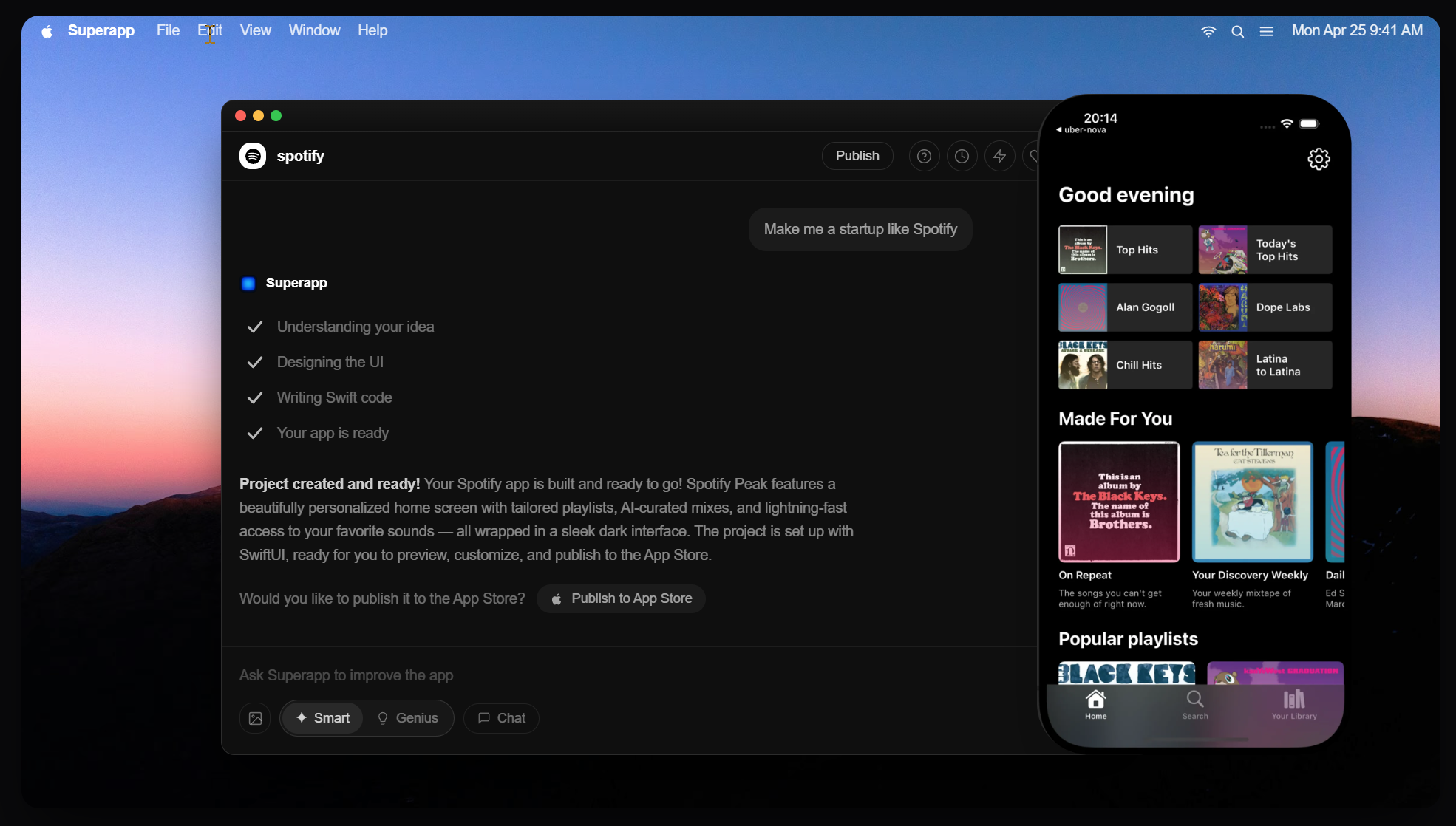
Screenshots & Images
Overview

Superapp is a no-code platform that enables you to build iOS and iPhone apps with AI, designed for creators, entrepreneurs, and developers who want faster, code-free app development.

Description

Make iOS & iPhone Apps with AI | No Coding Required — Superapp

Superapp is an AI-powered no-code platform that lets you create polished, production-ready iOS apps for iPhone (and beyond) in minutes—without writing a single line of code. It brings the power of AI to the app-building process, turning your ideas into native experiences that feel and perform like they were built by a professional development team.

What you get

  • AI-assisted app builder: Tell Superapp what you want, and the AI helps design interfaces, build navigation, generate content, and wire up basic app logic. It accelerates ideation and reduces guesswork at every step.
  • No-code, drag-and-drop editor: Arrange screens, components, and data flows with an intuitive visual editor. Prebuilt UI blocks, widgets, and templates take you from concept to prototype in no time.
  • Native iOS readiness: Output is tailored for iPhone (and iPad-compatible layouts) with crisp visuals, responsive layouts, and smooth performance that feel like a real Apple app.
  • Templates and design systems: Start fast with industry-ready templates for common app types—business, portfolio, ecommerce, events, education, and more—so you can launch sooner.
  • Backend and data handling: Define data models, user authentication, storage, and API integrations without writing server code. Connect to external services or use built-in backend capabilities to power your app.
  • Integrations and extensibility: Connect APIs, payments, analytics, and third-party services to extend functionality as your app grows.
  • Testing, preview, and iteration: Live previews on device or simulator, shareable test builds, and rapid iteration loops to refine UX and features.

How it works (at a glance)

  1. Choose a template or start from a blank canvas.
  2. Use the AI assistant to generate screens, flows, and content based on your goals.
  3. Drag-and-drop components to customize the UI and set up user interactions.
  4. Preview on real devices, test flows, and refine the experience.
  5. Produce production-ready builds and deploy to iOS distribution (or export for further customization).

Use cases

  • Startups and founders building MVPs quickly to validate ideas.
  • Small businesses creating native mobile experiences for customers.
  • Freelancers and creators crafting portfolio or service apps.
  • Education and training apps that require lightweight, interactive content.
  • Internal tools and team apps that automate processes and improve collaboration.

Why you'll love it

  • Speed and efficiency: Move from concept to live app far faster than traditional development.
  • Accessibility: No coding background required—empower non-technical teams to own app projects.
  • Cost efficiency: Reduce reliance on developers and shorten delivery timelines.
  • Flexibility: Iterate rapidly with AI guidance and visual edits, then scale with integrations as needed.
  • Quality and consistency: Design systems, templates, and native-ready output help you maintain a professional look and performance.

Getting started

  • Sign up for a free trial to explore templates and the AI assistant.
  • Define your app’s purpose, audience, and key features.
  • Build, test, and iterate with real-time previews.
  • Deploy production-ready builds to iOS distribution and publish with confidence.
Features
What you're building
The technical artifact this tool produces
Mobile app
App type
The domain or industry the built app is intended for
Business app
How you build
The interface and interaction model used to create the app
Prompt / chat
The builder runs as
How and where the builder tool itself is accessed
Web app
Min skill level
The minimum technical skill level required to use the builder effectively
Beginner
Coding required
The degree to which writing code is necessary
Zero code
Includes
Built-in components and capabilities the tool provides out of the box
UI builder
Backend logic
Database
API layer
Custom domain
Whether the tool allows publishing the app under a custom domain
Export formats
File formats or frameworks the tool can export the app as
Swift
ZIP
You own / can export the code
Whether the user can export and fully own the underlying source code
Enterprise features
Advanced features typically required by teams and organizations
SSO / SAML
Role-based permissions
White-labeling
Pricing
Available pricing and access models
Free plan available
Paid
Pricing
Tiered
Pro - 50 credits / month
$25
Business - 110 credits / month
$50
Max - 230 credits / month
$100
One Time
One-time credit top-up - 30 credits
$18
User Reviews
1,247 reviews
MK
Marcus K.
✔ Verified·SaaS Founder·Used 2 years
4.8
★★★★★
Overall
Ease of use
4.0
Features
5.0
Performance
4.5
Value
4.8
Support
4.5
Scalability
4.8
Plugins
5.0
Built my entire SaaS on Bubble — $40k MRR now

I was skeptical about no-code but Bubble proved me wrong. I built a B2B client portal with complex permissions, Stripe billing, and real-time notifications. The learning curve is real — give yourself 2–3 weeks — but once it clicks, you're unstoppable. Performance has been solid at our scale.

SaaSB2BStripe
SP
Sara P.
✔ Verified·Designer → Builder·Used 8 months
3.9
★★★★☆
Overall
Ease of use
2.5
Features
5.0
Performance
3.0
Value
4.0
Support
4.5
Scalability
3.5
Plugins
4.5
Incredibly powerful, but the learning curve is steep

Coming from Webflow, Bubble felt overwhelming at first. The editor UX isn't as polished, and performance on complex apps can feel sluggish. That said, nothing else lets you build a full database-driven app without code. The community forums are excellent — almost every problem has been solved by someone.

Webflow migrantDesign
JL
James L.
✔ Verified·Product Manager·Used 3 months
3.1
★★★☆☆
Overall
Ease of use
3.5
Features
4.5
Performance
3.0
Value
1.5
Support
3.0
Scalability
2.5
Plugins
4.0
Great for MVPs, but pricing scales poorly

Used Bubble to ship our MVP in 6 weeks, which was genuinely impressive. But once we needed real capacity, the jump from Growth to Team ($29 to $529/mo) was brutal for a bootstrapped startup. The server unit model is also confusing to reason about. Would love a mid-tier option.

MVPPricing concernBootstrapped
Community Showcases

Real apps built with Bubble by the community. Click any card to see full details.

NomadDesk
Remote workspace booking marketplace
🔥 142💡 89✨ 204
$14kMRR
GrantHive
Grant management SaaS for nonprofits
🔥 98💡 211✨ 76
StudyBuddy82%
StudyBuddy
AI-powered study planner mobile app
🔥 317💡 155✨ 430
RecruitFlowMK
RecruitFlow
Applicant tracking system for SMBs
🔥 67💡 188✨ 55
EventForge847attendees$42krevenue
EventForge
Event ticketing & management platform
🔥 231💡 142✨ 189
CourseForge
CourseForge
Online course platform with analytics
🔥 178💡 302✨ 144
Latest Updates
Mar 2025
Major
AI Autocomplete in Workflow Editor

Bubble now suggests the next workflow action based on your current logic using an embedded AI assistant — dramatically speeds up building complex multi-step flows.

Feb 2025
Improvement
Responsive Engine 2.0

Completely redesigned responsive layout system with per-breakpoint controls. Existing apps auto-migrate with one-click. Mobile apps now build 3× faster.

Jan 2025
Major
Native Git-style Version Branches

Team plan subscribers can now create development branches, make changes in isolation, and merge them back — similar to Git branching. Long requested by professional teams.

Dec 2024
Fix
Database Performance Improvements

Fixed significant performance degradation on apps with 1M+ rows caused by query planner regression. Apps now load 40–60% faster under heavy data loads.

Nov 2024
Improvement
Improved Plugin API v3

Rebuilt plugin API with TypeScript support, better error handling, and a new sandbox testing environment. Developer documentation fully rewritten.

Frequently Asked Questions
Superapp is an AI-powered native iOS app builder that generates production-ready Swift code and a complete iOS project. You describe the app, and Superapp creates the UI, data models, and the core app structure so you can ship to the App Store faster.
Superapp is built for founders, product teams, designers, and developers who want to ship native iOS apps quickly without building the entire app from scratch. It is especially useful if you want native performance and Apple-approved UX without a long engineering cycle.
You can build most data-driven iOS apps: marketplaces, subscriptions, community apps, booking apps, and internal tools. If your app needs a custom backend or complex integrations, Superapp gives you a native Swift codebase you can extend.
Superapp generates native Swift code, while Expo and React Native use JavaScript bridges. Native Swift apps have direct access to Apple APIs, lower overhead, and fewer performance bottlenecks. This makes it easier to pass App Store review and support iOS-specific features.
Flutter compiles to native code but uses its own rendering engine and Dart. Superapp generates pure Swift that integrates with Apple frameworks and UI patterns. Your app behaves like a first-class iOS app without custom rendering layers.
Web-based builders like Bubble or Glide often wrap a web app in a container. This can lead to slower performance, limited iOS feature access, and App Store approval risks. Superapp creates real native iOS apps with full access to iOS capabilities.
Most teams can go from idea to a working native iOS app in days instead of months. Superapp generates a full Swift project that you can build and submit to the App Store after review and testing.
Yes. Superapp generates a native Swift codebase that you own and can modify. You can take the project into Xcode, customize it, and continue development independently.
Absolutely. The output is a standard Swift iOS project, so iOS developers can add features, integrate SDKs, or refactor as needed.
Superapp can generate database schemas and data models and connect them to your iOS app. This speeds up backend setup and gives you a working data layer without writing a custom backend from scratch.
Yes. You can connect your app to any backend by updating the generated Swift code. Superapp is not locked to a single backend provider.
You control your data and backend infrastructure. Superapp does not take ownership of your data.
Superapp generates native Swift apps that follow Apple UI conventions, which reduces approval risk. You still need to provide the required App Store metadata and ensure your app complies with Apple policies.
Yes. The generated app is pure Swift with native UI components and iOS APIs. There is no JavaScript bridge or web wrapper.
Superapp provides a built-in design system you can customize. You can adjust typography, color, spacing, and components in the generated project to match your brand.
Yes.
Start by describing your app idea and required screens. Superapp will generate a working iOS project you can review, customize, and ship.
Yes, it can—but it works by using your Lovable or Replit project as a reference, not by importing or wrapping it. Superapp generates a native Swift iOS app, so you rebuild the key screens and flows natively from your existing app.
Yes, it can—but it works by using your Figma designs as a reference, not by directly importing files. You can describe the screens and design system, then fine-tune the generated Swift UI to match your Figma.
Yes, it can—but it works by using your website as a reference, not by converting it. Superapp generates native Swift code, so you recreate the experience as a native iOS app.
Links
ToolStack Verdict
9.1
Exceptional

Bubble remains the gold standard for full-stack no-code development. The power ceiling is unmatched — if you're willing to climb the learning curve, you can build virtually anything. Best for ambitious founders and product teams.

Pros

  • Full-stack in one tool
  • Huge plugin ecosystem
  • Real-time features built-in
  • Thriving community

Cons

  • Steep learning curve
  • No code export
  • Performance at scale
  • Pricing jump is large
Quick Facts
Founded2012
HeadquartersNew York, USA
Funding$100M+ (Series A)
Users4M+ builders
Apps built2M+ total
Free planYes
Pricing from$29/mo
CategoryVisual App Builder
Mobile appsWeb only
Open sourceNo
Last reviewedMar 2025
Best For
SaaS MVPs & startups
Marketplaces & directories
Client portals & dashboards
Community platforms
Native mobile apps
Static marketing sites