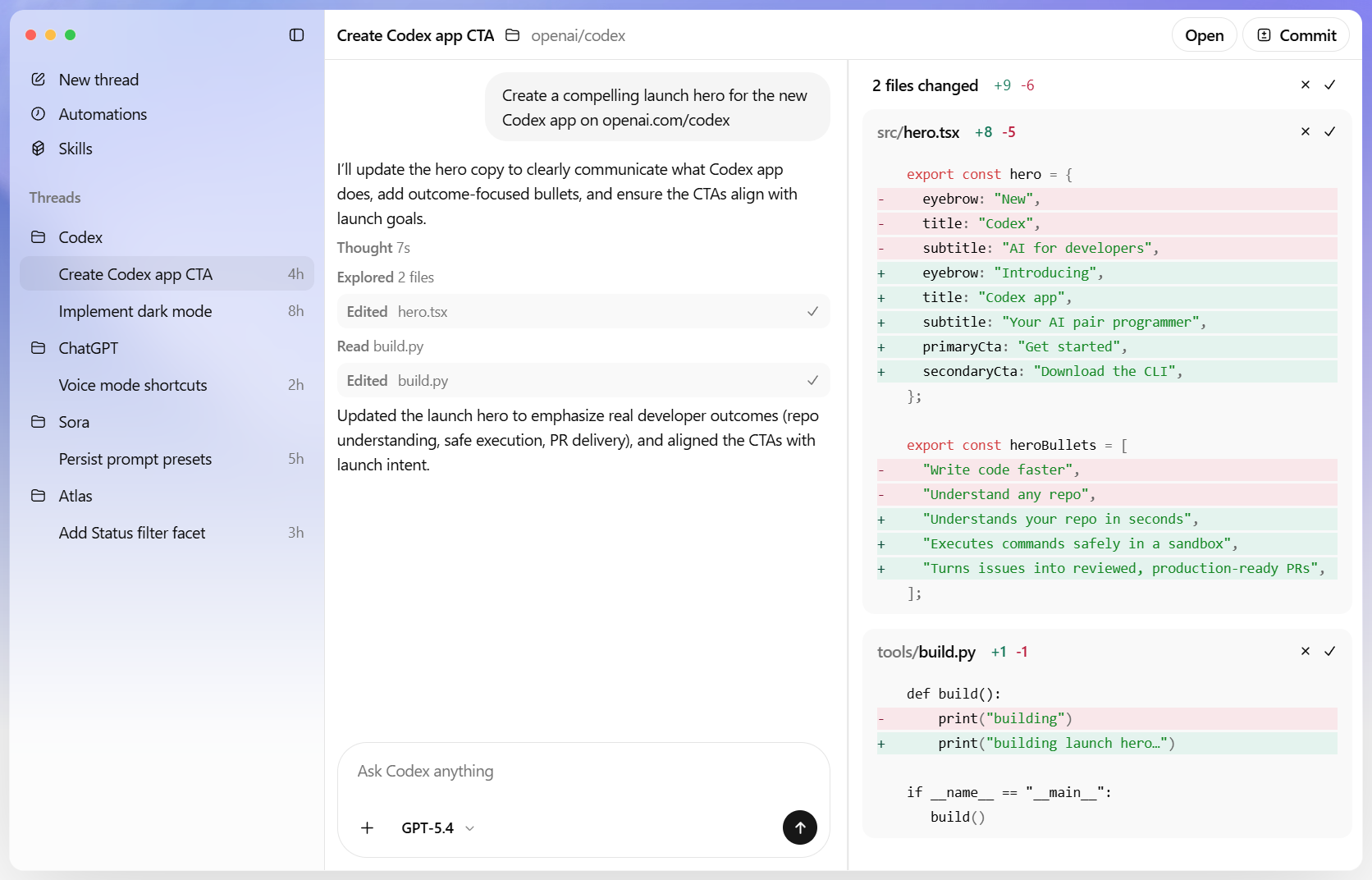
Codex

A coding agent that helps you build and ship with AI—powered by ChatGPT.

Screenshots & Images
Overview

Codex is an AI coding partner from OpenAI that helps teams and developers write, review, refactor, and ship code faster. Available as a web app, desktop app, IDE extension and CLI, Codex supports multi-agent workflows, automated background tasks, code reviews, and integrations (GitHub, Slack, Linear). It’s built for engineering teams who want to accelerate development, improve review quality, and automate routine engineering work.

Description

Codex — AI Coding Partner from OpenAI

Codex is an AI coding partner that helps you build and ship with AI, powered by ChatGPT. Built for real engineering work, Codex can tackle tasks from routine pull requests to your most challenging problems—facilitating feature development, migrations, refactors, and more.

Key capabilities

  • Built for multi-agent workflows
  • A command-center for agentic coding with built-in worktrees and cloud environments
  • Agents work in parallel across projects, turning weeks of work into days
  • End-to-end task execution, designed to accelerate engineering momentum

  • Adapts to how your team works

  • Skills expand Codex beyond writing code to code understanding, prototyping, and documentation
  • Keeps outputs aligned with your team’s standards and workflows

  • Always-on background work

  • Automations handle routine yet important tasks like issue triage, alert monitoring, and CI/CD
  • Lets your engineers stay focused on higher-leverage work

  • The same agent everywhere

  • One consistent Codex experience across web, CLI, IDE extension, and iOS
  • Cloud-based features like code review and Slack integration to streamline collaboration

  • Start fast, move smoothly to your editor

  • Begin in the Codex app, then move to your code editor or terminal
  • Seamless transitions—from cloud environments to local development, to the terminal

  • A productive ecosystem

  • Cloud integrations and collaboration tools help teams review, automate, and scale
  • Access to the latest models (GPT-5.5, GPT-5.4, GPT-5.3-Codex-Spark) with specialized variants like GPT-5.4-mini

Why Codex helps teams

  • Improves quality and speed
  • Codex raises baseline design quality, accelerates testing, and strengthens code review
  • Teams ship with greater confidence and fewer late-stage surprises

  • Scales with your organization

  • Plans and credits support individuals, teams, and enterprises
  • Flexible pricing with seats, shared workspaces, and enterprise-grade controls

  • Enables practical use cases

  • Feature development, migrations, and large-scale refactors
  • Prototyping, documentation, and code understanding as integral parts of the workflow
  • Automatic reviews, cross-tool integrations, and automated background tasks

Pricing and usage at a glance

  • Plans range from Free to Enterprise, with Go, Plus, Pro, Business, and Education options
  • Usage is token/credit based, not just per message
  • The latest models (including GPT-5.5, GPT-5.4, and GPT-5.3-Codex) are available, with variants like GPT-5.4-mini for higher local usage limits
  • Pro and higher tiers include promotions that boost Codex usage for a period
  • Image generation and other features count toward Codex usage limits; credits can be purchased to extend work without upgrading plans
  • For teams, there are credits and workspace controls, plus admin features (SAML SSO, MFA, RBAC) in higher plans

If you hit usage limits, you can purchase extra credits or switch to smaller models to extend your budget. You can also run tasks locally using an API key with standard pricing.

Features
What you're building
The technical artifact this tool produces
Web app
Desktop app
CLI tool
App type
The domain or industry the built app is intended for
Business app
Productivity
How you build
The interface and interaction model used to create the app
Prompt / chat
From existing codebase
The builder runs as
How and where the builder tool itself is accessed
Web app
Desktop app
Min skill level
The minimum technical skill level required to use the builder effectively
Intermediate
Coding required
The degree to which writing code is necessary
Code optional
Includes
Built-in components and capabilities the tool provides out of the box
Backend logic
Auth / user management
API layer
Custom domain
Whether the tool allows publishing the app under a custom domain
Export formats
File formats or frameworks the tool can export the app as
HTML / CSS / JS
ZIP
APK / IPA
You own / can export the code
Whether the user can export and fully own the underlying source code
Enterprise features
Advanced features typically required by teams and organizations
SSO / SAML
Role-based permissions
Audit logs
Pricing
Available pricing and access models
Free plan available
Paid
Usage-based
Pricing
ChatGPT subscription tiers (Flat monthly rates) ( Flat Rate )
Free (Codex included)
$0 /mo
Go (lightweight coding tasks)
$8 /mo
Plus (focused coding sessions)
$20 /mo
Pro $100 (higher rate limits — promotional boosts apply)
$100 /mo
Pro $200 (highest Pro tier — ongoing higher limits)
$200 /mo
API Key (usage-based) ( Usage Based )
API Key (pay only for tokens used)
Business (pay-as-you-go / seats) ( Usage Based )
Business — pay as you go (assign seats or usage-based seats)
Enterprise & Edu (contact sales) ( Request Quote )
Enterprise / Edu (contact sales for pricing & seats)
User Reviews
1,247 reviews
MK
Marcus K.
✔ Verified·SaaS Founder·Used 2 years
4.8
★★★★★
Overall
Ease of use
4.0
Features
5.0
Performance
4.5
Value
4.8
Support
4.5
Scalability
4.8
Plugins
5.0
Built my entire SaaS on Bubble — $40k MRR now

I was skeptical about no-code but Bubble proved me wrong. I built a B2B client portal with complex permissions, Stripe billing, and real-time notifications. The learning curve is real — give yourself 2–3 weeks — but once it clicks, you're unstoppable. Performance has been solid at our scale.

SaaSB2BStripe
SP
Sara P.
✔ Verified·Designer → Builder·Used 8 months
3.9
★★★★☆
Overall
Ease of use
2.5
Features
5.0
Performance
3.0
Value
4.0
Support
4.5
Scalability
3.5
Plugins
4.5
Incredibly powerful, but the learning curve is steep

Coming from Webflow, Bubble felt overwhelming at first. The editor UX isn't as polished, and performance on complex apps can feel sluggish. That said, nothing else lets you build a full database-driven app without code. The community forums are excellent — almost every problem has been solved by someone.

Webflow migrantDesign
JL
James L.
✔ Verified·Product Manager·Used 3 months
3.1
★★★☆☆
Overall
Ease of use
3.5
Features
4.5
Performance
3.0
Value
1.5
Support
3.0
Scalability
2.5
Plugins
4.0
Great for MVPs, but pricing scales poorly

Used Bubble to ship our MVP in 6 weeks, which was genuinely impressive. But once we needed real capacity, the jump from Growth to Team ($29 to $529/mo) was brutal for a bootstrapped startup. The server unit model is also confusing to reason about. Would love a mid-tier option.

MVPPricing concernBootstrapped
Community Showcases

Real apps built with Bubble by the community. Click any card to see full details.

NomadDesk
Remote workspace booking marketplace
🔥 142💡 89✨ 204
$14kMRR
GrantHive
Grant management SaaS for nonprofits
🔥 98💡 211✨ 76
StudyBuddy82%
StudyBuddy
AI-powered study planner mobile app
🔥 317💡 155✨ 430
RecruitFlowMK
RecruitFlow
Applicant tracking system for SMBs
🔥 67💡 188✨ 55
EventForge847attendees$42krevenue
EventForge
Event ticketing & management platform
🔥 231💡 142✨ 189
CourseForge
CourseForge
Online course platform with analytics
🔥 178💡 302✨ 144
Latest Updates
Mar 2025
Major
AI Autocomplete in Workflow Editor

Bubble now suggests the next workflow action based on your current logic using an embedded AI assistant — dramatically speeds up building complex multi-step flows.

Feb 2025
Improvement
Responsive Engine 2.0

Completely redesigned responsive layout system with per-breakpoint controls. Existing apps auto-migrate with one-click. Mobile apps now build 3× faster.

Jan 2025
Major
Native Git-style Version Branches

Team plan subscribers can now create development branches, make changes in isolation, and merge them back — similar to Git branching. Long requested by professional teams.

Dec 2024
Fix
Database Performance Improvements

Fixed significant performance degradation on apps with 1M+ rows caused by query planner regression. Apps now load 40–60% faster under heavy data loads.

Nov 2024
Improvement
Improved Plugin API v3

Rebuilt plugin API with TypeScript support, better error handling, and a new sandbox testing environment. Developer documentation fully rewritten.

Frequently Asked Questions
Usage limits depend on the model, task complexity, and whether tasks run locally or in the cloud. Small scripts use far fewer messages than long-running sessions that need more context. Different models (GPT-5.5, GPT-5.4, GPT-5.4-mini, GPT-5.3-Codex) have different included limits per plan; Plus, Pro, Business, Enterprise and API Key options each have specific local-message and cloud-task limits. See your plan’s Codex usage table in the docs for exact numbers.
Plus and Pro users can buy additional credits to continue working. Business, Edu, and Enterprise workspaces with flexible pricing can purchase additional workspace credits. You can also switch to a smaller model or run extra local tasks with an API key (billed at standard API rates).
Image generation counts toward the general Codex usage limits and consumes included limits roughly 3–5× faster than similar text-only turns (varies by image quality/size). Image generation is not available on the Free plan; after included limits are used, image generation draws from credits or API token billing when using an API key.
Currently Pro $100 includes a temporary 2× Codex usage boost through May 31, 2026 (effectively 10× Plus during the promo). Pro $200 includes an ongoing 20× Plus benefit and additional temporary boosts to certain 5‑hour limits through May 31, 2026. See the Pro plan details for promo terms.
You can view current limits in the Codex usage dashboard (Codex settings > usage). In an active Codex CLI session you can also run /status to check remaining limits.
Credits extend usage after you exhaust included limits. As of the announced pricing migration, credits map to API token-based rates (credits per 1M input, cached input, and output tokens). Consumption varies with mix of input/cached/output tokens; new rate cards are shown per plan type in the docs.
Code Review usage applies when Codex runs reviews through GitHub (for example tagging @Codex in a pull request or enabling automatic reviews on a repository). Reviews run locally or outside GitHub count toward general usage limits instead.
Be concise with prompts, reduce AGENTS.md size or nest project instructions, limit the number of MCP servers, disable MCPs when not needed, and switch to a smaller model (e.g., GPT-5.4 or GPT-5.4-mini) for routine tasks.
Links
Website openai.com
Youtube youtube.com
Linkedin linkedin.com
Instagram instagram.com
Discord discord.gg
ToolStack Verdict
9.1
Exceptional

Bubble remains the gold standard for full-stack no-code development. The power ceiling is unmatched — if you're willing to climb the learning curve, you can build virtually anything. Best for ambitious founders and product teams.

Pros

  • Full-stack in one tool
  • Huge plugin ecosystem
  • Real-time features built-in
  • Thriving community

Cons

  • Steep learning curve
  • No code export
  • Performance at scale
  • Pricing jump is large
Quick Facts
Founded2012
HeadquartersNew York, USA
Funding$100M+ (Series A)
Users4M+ builders
Apps built2M+ total
Free planYes
Pricing from$29/mo
CategoryVisual App Builder
Mobile appsWeb only
Open sourceNo
Last reviewedMar 2025
Best For
SaaS MVPs & startups
Marketplaces & directories
Client portals & dashboards
Community platforms
Native mobile apps
Static marketing sites