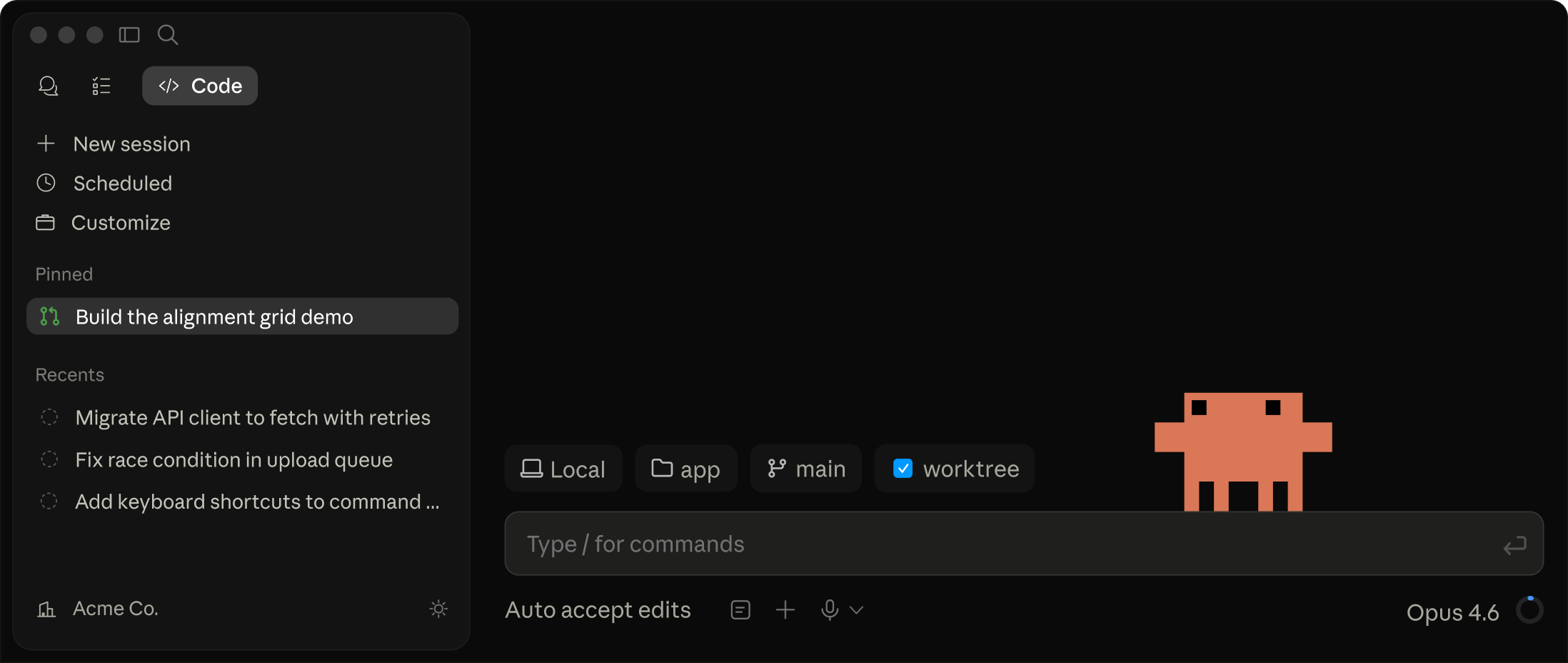
Claude Code brings Claude's coding intelligence into the places developers already work. Run it in your terminal, IDE (VS Code or JetBrains), desktop app, Slack, or the browser to analyze codebases, make multi-file edits, run tests, and produce ready-to-review pull requests — accelerating routine tasks and large refactors while integrating with your existing tools and CI.
Claude Code — AI-powered coding assistant for developers
Claude Code helps you write, debug, and ship faster by pairing with you wherever you work. Built to live inside your codebase, it enhances your terminal, IDE, Slack, or web flow without getting in your way.
What makes Claude Code different
- Work directly in your environment: reads your local code, writes changes, runs tests, and opens PRs.
- No backend code index needed: runs locally in your terminal with permission prompts before making changes.
- Agentic, context-aware guidance: understands your project, dependencies, and goals to plan and execute multi-file edits.
Core features
- Multi-platform coding from a single workflow
- Desktop app, VS Code extension, JetBrains plugin, web access, and Slack integration.
- Open in browser or pair Claude Code with your phone for on-the-go work.
- End-to-end code changes
- Describe what you need and Claude Code generates, edits, and tests across files.
- Produces clean diffs and ready-to-merge PRs.
- Refactoring and feature work at scale
- Powerful multi-file edits, safe code modernization, and architectural improvements.
- Helps with bug fixes, testing, and new feature implementation.
- Real-time collaboration and efficiency
- Keeps you in the flow with automated tasks, routine checks, and rapid iteration.
- Turn issues into actionable PRs and automated routines to run on a schedule or via API.
Platforms and integrations
- Desktop app for full-featured local workflows
- IDE integrations: VS Code, JetBrains
- Web access for browser-based coding
- Claude Code for Slack to collaborate in teams
- Open in browser and pair with mobile for seamless handoff
How it works
- Local-first
- Claude Code reads your code locally, runs commands, and generates changes with explicit user permission.
- No remote backend index of your code is required.
- Model options
- Opus 4.7, Sonnet 4.6, and Haiku 4.5 provide a balance of speed and capability.
- Enterprise users can leverage existing cloud deployments as needed.
- Flexible workflow
- Tasks can start in the terminal, in an IDE, or from Slack/Browser, then move through to test and PR stages.
Use cases
- Bug fixes and patching: diagnose, implement, test, and submit a PR without leaving your editor.
- Refactors and architectural improvements: reason about dependencies and coordinate changes across files.
- Feature development: generate boilerplate, implement logic, and validate with tests.
- Code modernization and modernization-wide upgrades across large codebases.
- Team collaboration: share context, get consistent edits, and accelerate review cycles.
Getting started
- Download Claude Code and sign in with your Claude Console credentials.
- Install the appropriate IDE extension (VS Code or JetBrains) or use Desktop/Web/Slack as your workflow.
- Start a task: describe the change, Claude Code analyzes context, and begins making coordinated edits.
- Review diffs, run tests, and merge when ready.
Plans / pricing
- Flexible plans to fit teams and individuals (Pro, Max, Team, Enterprise).
- API-based access available for broader automation and integration.
- Pricing aligns with plan type and usage; enterprise options include advanced security and administration.
Why developers choose Claude Code
- Boosts coding speed by reducing context switching and repetitive tasks.
- Improves code quality with consistent edits and automated testing.
- Keeps you in your familiar tools while extending their capability with AI-assisted changes.
For Individuals ( Flat Rate )
Team ( Per Seat )
Enterprise ( Request Quote )
Claude API (pay as you go) ( Usage Based )
I was skeptical about no-code but Bubble proved me wrong. I built a B2B client portal with complex permissions, Stripe billing, and real-time notifications. The learning curve is real — give yourself 2–3 weeks — but once it clicks, you're unstoppable. Performance has been solid at our scale.
Coming from Webflow, Bubble felt overwhelming at first. The editor UX isn't as polished, and performance on complex apps can feel sluggish. That said, nothing else lets you build a full database-driven app without code. The community forums are excellent — almost every problem has been solved by someone.
Used Bubble to ship our MVP in 6 weeks, which was genuinely impressive. But once we needed real capacity, the jump from Growth to Team ($29 to $529/mo) was brutal for a bootstrapped startup. The server unit model is also confusing to reason about. Would love a mid-tier option.
Real apps built with Bubble by the community. Click any card to see full details.
Bubble now suggests the next workflow action based on your current logic using an embedded AI assistant — dramatically speeds up building complex multi-step flows.
Completely redesigned responsive layout system with per-breakpoint controls. Existing apps auto-migrate with one-click. Mobile apps now build 3× faster.
Team plan subscribers can now create development branches, make changes in isolation, and merge them back — similar to Git branching. Long requested by professional teams.
Fixed significant performance degradation on apps with 1M+ rows caused by query planner regression. Apps now load 40–60% faster under heavy data loads.
Rebuilt plugin API with TypeScript support, better error handling, and a new sandbox testing environment. Developer documentation fully rewritten.